Technical overview
The ARS2 can roughly be divided into three "portions"; the analog portion, the digital portion and
the software portion.
The ARS2 started out as a analog project but has developed in to a analog synthesizer with
digital control. The synthesis portion is still analog and is built up in a
modular
sense so that modifying one function does not imply having to
change the whole internal circuitry. Thus, when adding the digital portion of the synthesizer,
none of the analog functions where changed, they were merely interfaced on some critical points
with a digital CV generator instead of a analog.
The analog portion
Click the picture for a more detailed postscript file
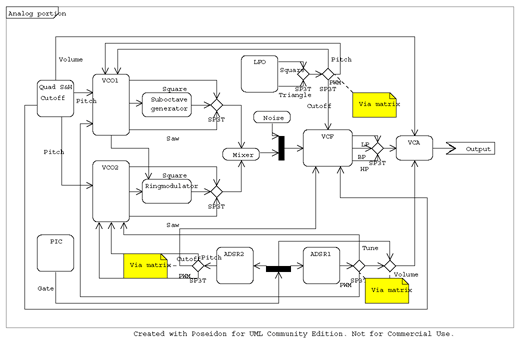
Above is a function diagram of the analog portion of the synthesizer. As can be seen in the diagram,
the synthesizer contains the usual building blocks you would expect to find in a analog synthesizer;
Two VCOs, a VCF, two ADSRs, a LFO, a mixer, a VCA and a output stage. Additional circuitry includes a
simple ringmodulator, a suboctave generator and a "signal matrix".
In the middle of the diagram, spanning from the VCOs, the mixer, the VCF, the VCA and finally the output
stage is the soundpath. All the other lines are Control Voltage connections.
The digital interfacing is done via the Quad S&H, the GATE signal is generated directly by the PIC.
The digital portion does not change any of the contents in the soundpath, it only generates
four Control Voltages.
The signal matrix is a circuit which compensates for the fact that the SP3T switches i used have a
NC (no connection) state as the middle state. To be able to route the signal three directions instead
of two, i cooked up a small routing circuit (hence matrix) that uses FET switches and the SP3T outputs
as digital controls to route the signal in question.
The digital portion
Click the picture for a more detailed postscript file
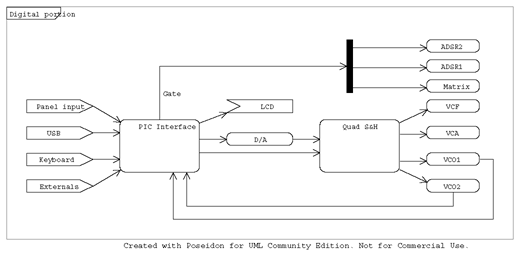
Above is a function diagram of the digital portion of the synthesizer.
This part is separated from the analog in the way that all the
communication
from
the PIC interface to the analog
circuitry is done via the Quad S&H, with exception for the GATE signal.
The function of the Quad S&H is to sample the value currently presented at the D/A output and store
it in one of the four S&H's. The PIC decides what value to output and which S&H that is allowed
to sample, thus from one input being able to output four analog lines.
The refresh of the S&H's is fairly critical and the design allways leaves one S&H charging.
The VCO's are conncted back to the PIC inteface to allow for the frequency counting that is a (THE) vital
part of the tuning function.
Since choosing a PIC with a limited number of output- and input-pins, all datacommunication is
done via a small set of shared outputs/inputs with the exception that each function has a dedicated
enable
pin.
The software portion
Click the picture for a more detailed postscript file
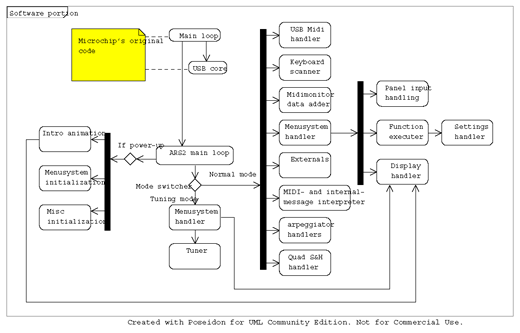
The software is based upon the USB/CDC example code supplied by Microchip. It started out as a simple
USB MIDI to CV for controlling the VCO's pitch but quickly evolved into a small software library.
The main ARS2 functionality can be divided into two different phases; the initialization phase and the
looping phase. During initialization all variables are setup and necessary hardware initializations
are done.
The main loop is divided into different
modes
, this is used to define specific behaviour
for processor-heavy functions that needs the CPUs (almost) undivided attention. This statement needs to
be clarified; "almost" undivided attention means simply that there is no way of escaping the USB-communication
overhead, this is done deliberately to avoid usb hosts to interpret the synthesizer as malfunctioning or
not turned on. The only existing
modes
so far is "normal" and "tune".
In normal mode the sequence of operation goes as follows:
- Fetch USB MIDI data. If any, store it as incoming MIDI message
- Scan keyboard for change. If any, store it as incoming MIDI message
- Add any incoming MIDI message to the MIDI Monitor history
- Process menusystem - this can entail displaying a message, a menu, a setting or a selected function
it can also entail a on-the-fly change of any setting
- Check if any external controllers have changed value.
this is not implemented yet
- Process incoming MIDI message - takes care of key queing and decides on new values to
be outputed to VCO1, VCO2, VCF, VCA and GATE.
- Process arpeggios - this function overrides the VCO1 and/or VCO2 pitch setting set by
the previous stage if the arpeggio for the VCO in question is turned on.
- Send new values to S&H or update old values