Back to Projects
Counter and Matrix
(Revised March 1, 2013)This part wasn't too bad. Could be done with fewer resistors and the Clock could be simpler.
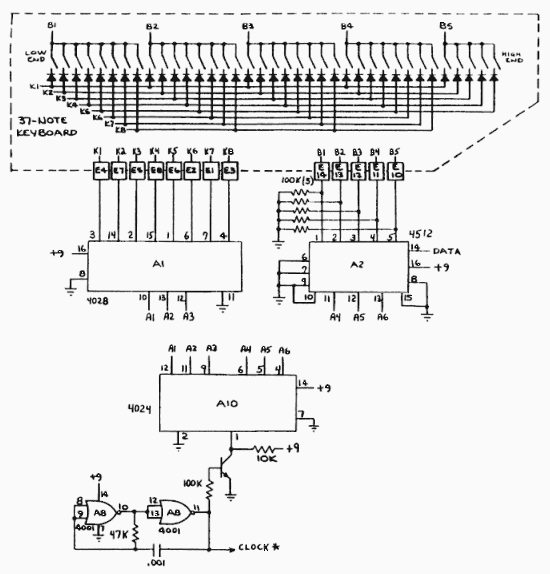
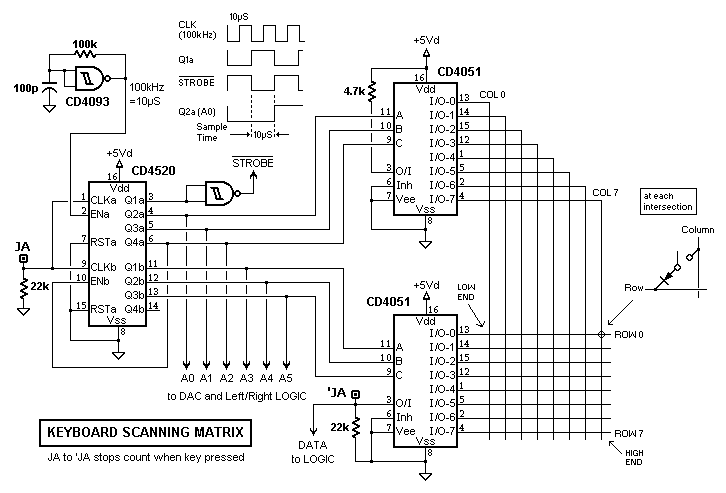
While there are many ways to make a keyboard scanning circuit, the important part here is to send the proper signals to the LEFT and RIGHT logic circuitry: a 6-bit binary count (A0-A5), a logic '1' for a pressed key (DATA), and a low-going strobe (called CLOCK* in the Oberheim schema.) during the 2nd half of each toggle of the Least Significant Bit. Although, cheesy as it is, a CD4024 ripple counter would probably be good enough (it was good enough for Oberheim,) I've specified a CD4520, but not because it is a synchronous counter. Both 4-bit counters of a 4520 have CLK and ENable inputs, which are somewhat interchangable: if ENable is used as a clock input, then the CLK input becomes an enable/disable. The ability to stop the count may be useful for testing or adjusting the DAC.
The Q1a output of the 4520 is inverted to create /STROBE and Q2a becomes the LSB. With a 100kHz clock, /STROBE will have a duration of approx. 10uS, which is a good acquisition time for the LF398 sample and hold. The schmitt trigger oscillator is why the NANDs in the Left-Right logic are schmitts.
The CD4051 analog multiplexers here are always enabled (INHIB = 0): Strobing them isn't necessary because nothing will happen in the LEFT-RIGHT note/voice assignment logic until /STROBE goes low and count and DATA will be valid by then. In fact, we want the key state to be ready and waiting when /STROBE=0 happens.
Basically, the matrix Rows are groups of eight keys, and the Columns are each key within each group. An 8x8 matrix will accommodate a 5-octave keyboard (61 keys), but 4-octaves (49 keys) seems about right for a 2-voice synth. Inexplicably, I find 3-octave keyboards offensive.
Back to Projects contact: rocking softhome.net